Showing posts with label Car Diagnostic Tool. Show all posts

Saturday, December 15, 2018

Free download ECM TITANIUM 1.61 with 26000+ drivers


Free download 2016 ECU TITANIUM V1.61 with 26000+ drivers, fit for ECU software (Kess v2 or  KTAG with Ksuite) and editing maps ith many modules checksum, to work directly on main sections: air control, torque, fuel injection system, radiator, turbo and many other variants are available.

Free download
ECM TITANIUM 1.61 with 26000+ drivers (unknow security, pass: garage)
NITROFLARE – INTERCHANGEABLE LINKS (40 MB)
http://www.nitroflare.com/view/A92E12E250B3F26/ecm_titanium_1.61.rar
UPLOADED – INTERCHANGEABLE LINKS (40 MB)
http://ul.to/i0xfy3gg
FILEUPLOAD – INTERCHANGEABLE LINKS (40 MB)
http://fileupload.pw/6xyw3qnh8m79
MYFILES – INTERCHANGEABLE LINKS (40 MB)
http://myfiles.onl/6jsw7aa5lm6y
TURBOBIT – INTERCHANGEABLE LINKS (40 MB)
http://turbobit.net/32nv3x4xga5i.html
HITFILE – INTERCHANGEABLE LINKS (40 MB)
http://www.hitfile.net/038L

ECM TITANIUM 1.61 (safe, cracked)
ECM TITANIUM 1.61 with 26000 drivers
ECM TITANIUM 1.61 with 18475 drivers


Highlight of ECM TITANIUM 1.61 software:
NEW generation of drivers. Drivers who offer an organized and powerful interface to create and manage projects for ECM Tuning V1.61 modified files. After reading the file stored in the ECU memory, all you have to do is upload the file and the software starts a search for the presence of both the compatible drivers database.

Operating system:
Windows 8 and Windows 7 64 bit does not work …
Windows xp, Win7 x32 if it works
(a user said, “Working very good on windows xp sp3 and win 7 ultimate”)
Note:
martkey.dll error should be installation issues. Try systems above

Languages:
Deutsch, English, Portuguese, French, Spanish,Italian

How to change ECM Titanium language?
go to the 3rd tab (strumenti in italian) (instuments in english)
then second from bottom in list says (selezione lingua) ( select language)
click it then change to whatever language you want


What to do if Virus in Titanium.exe file (unusable software)?
Almost every program with modified .exe files report false positive virus on antivir,this applies to games as well as apps.options are
A:remove your antivirus program and live with it.
B:if you’re afraid of bugs then buy original program
C:buy couple of laptops, one for everyday use, one for programs like this, one for the wife to play farmville.
BTW: This program works like a charm.


Free Download and install Toyota Techstream 12.20.024 on Windows 7

Toyota TIS Techstream V12.20.024 new software  has been tested without issues on Windows 7 operation system and verified working like a charm.

Software version: V12.20.024 
Toyota Techstream 12.20.024 cr@ck free download: Click Here

(It’s crack version. Does not need activation)
Operation system: Windows 7 32 bit

Toyota Teschstream v12.20.024 has been tested OK with:
Mini VCI cables (SV46, SV46-B), Mangoose VCI (SV46-C) and Vxdiag Vcx Nano for Toyota


How-to’s:

 Step 1: install Toyota Techstream 12.20.024 software

open Techstream 12.20.024 disk F:
copy all files to another new folder on Desktop
open Techstream 12.20.024 setup application
choose a setup language for installation


preparing setup
Next to install Techstream software


accept the agreement
enter the user name and company name, then Next
begin Techstream 12.20.024 installation
installing Techstream 12.20.024…
successfully installed Techstream

Finish Techstream v12 installation


Step 2: replace the MainMenu.exe

copy the MainMenu.exe
go to Techstream Properties on Desktop
open file location
paste and replace MainMenu.exe in Program files/toyota diagnostics/techstream/bin


Step 3: install MVCI driver

run MVCI driver for TOYOTA TIS SETUP
Next to install MVCI driver

Install
installing MVCI driver
Finish MVCI driver installation


Step 4: register Techstream

run Techstream application on Desktop
Yes to continue
close the internet explorer
this is Toyota Techstream ver.12.20.024 interface

register Techstream software 12.20.024
it’s Techstream crack version
use key (attached to the Instructions.txt) to register

OK
exit Techstream


Step 5: check MVCI fw version

run MVCI firmware update tool on Desktop
Device info

exit MVCI firmware update tool


Step 6: run Techtsream 12.20.024

run Techstream application on Desktop
Yes to continue
close the internet explorer


Techtsream 12.20.024 Windows 7 installation success!

FVDI 2018 Full Software Download and Installation


How to install FVDI 2018 software on Windows 7?
Download software above
Open setup  FVDI2018_STIC

Select Setup language

Select software to install, press Next

Select install external drivers and external dependency, press Next

Click on Install
Installing

Setup installation finished. This will generate ABRITES Quick Start on desktop
Select not to start computer now.

Open ABRITES Quick Start
Software installation is done.
Check software functions, i.e VVDI2 function


Check FVDI 2018 BMW functions


Check FVDI 2018 Mercedes functions


3. FVDI 2018 FAQs:

Q1: What’s the difference among FVDI 2018, FVDI 2015 and FVDI 2014.
A1: Version 2018 has 2 features in addition to 2015 or 2016 and will not be blocked by 2015.
It also has the VVDI2 function for the VAG and BMW range.


Q2:I I have a problem that when starting error (FVDI 2018 commander Loader V2) is displayed with Device deactivated and connect server failed.


A2:
The Quick Loader V2.0 is out of service, have to reinstall V3.0 software!! Download software above and install.
Or without Internet —C /Program X86-Abrites -open folder with mark where the loader is and start Loader from there.


Q3: The program cannot start because mfc110u is missing. Dll on the team. Internet reinstall the program to correct the problem.

A3: Mfc110u.dll errors are caused by situations that lead to the removal or corruption of the mfc110u DLL file, which is a file associated with Microsoft’s Visual Studio software.. please find the “patch” in installation folder, install all the files in “Patch” folder; the problem will be solved;  Go to the software installation folder, you’ll find the patch folder, install all files in the folder
: C:\ program files (x86)\abries \ patch

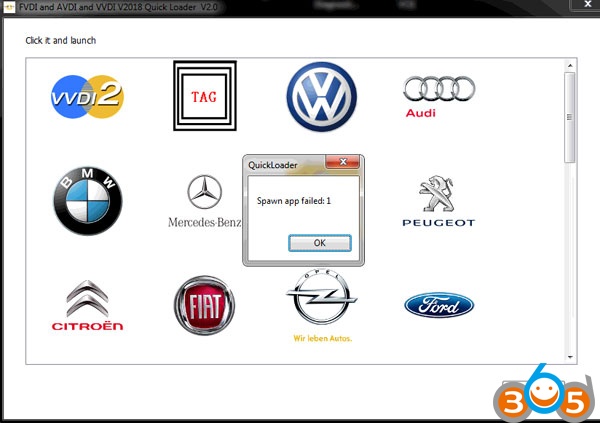
Q4: Have software installation problem with V2018 FVDI? Device not opened? Spawn app failed:1?


A4:
Close antivirus software; connect FVDI to computer via USB; 
You should connect FVDI to computer before software installation; Reinstall the driver manually to solve the problem USB driver files locate in installation folder “USB interface”.

Tuesday, April 9, 2013

CD Team 21 : Diagnosis Technician Engine


CD Team 21 : Diagnosis Technician Engine

Download free Click here

Share

Twitter Delicious Facebook Digg Stumbleupon Favorites More